<?xml version="1.0" encoding="utf-8"?><feed xmlns="http://www.w3.org/2005/Atom" ><generator uri="https://jekyllrb.com/" version="4.4.1">Jekyll</generator><link href="http://www.charlesmercadal.com/feed.xml" rel="self" type="application/atom+xml" /><link href="http://www.charlesmercadal.com/" rel="alternate" type="text/html" /><updated>2025-10-29T16:31:07-04:00</updated><id>http://www.charlesmercadal.com/feed.xml</id><title type="html">cdm</title><subtitle>To everything there is a season.</subtitle><entry><title type="html">That’s how they get you: faux phishing scams</title><link href="http://www.charlesmercadal.com/technology/2021/08/02/thats-how-they-get-you.html" rel="alternate" type="text/html" title="That’s how they get you: faux phishing scams" /><published>2021-08-02T08:15:00-04:00</published><updated>2021-08-02T08:15:00-04:00</updated><id>http://www.charlesmercadal.com/technology/2021/08/02/thats-how-they-get-you</id><content type="html" xml:base="http://www.charlesmercadal.com/technology/2021/08/02/thats-how-they-get-you.html"><![CDATA[<p>The company I work for contracts with an outside party, the folks
at <a href="https://www.knowbe4.com">KnowBe4</a> to conduct fake phishing
attempts on employess.</p>

<p>These annoyed me at first, but then I figured out a mail rule that
would send them right to my junk mail folder.  Our company, however,
then moved to a different system for delivering us the fake phishing
attempts, and now I can’t filter them out any more.</p>

<p>Usually I find phishing attempts pretty transparent – but this 
one almost got me:</p>
<ul>
  <li>It was sent at 5-something AM.  I first saw it at 6-ish AM.  I don’t do my best mental work at 6 AM.</li>
  <li>I sure hate to be late on getting my work done.</li>
</ul>

<p>Tapping on the message, this is what I saw first:</p>

<p><img src="/assets/images/phish-planner1.png" width="375" height="667" alt="Microsoft Planner phishing attempt" /></p>

<p>And – yikes.  Eight late assignments?  Complete these in a few days?!</p>

<p>Luckily I was awake enough to slow my roll and think… what kind
of software gives you a warning message that your manager is going
to contact you?</p>

<p>Then I realized, uh, I’ve never touched Microsoft Planner.</p>

<p>So I checked the sender …</p>

<p><img src="/assets/images/phish-planner2.png" width="375" height="667" alt="Microsoft Planner phishing attempt" /></p>

<p>The fakey domain name finally made it clear.</p>

<p>I’m super glad I didn’t click the link, or I would have had to go
through KnowBe4’s remedial <em>don’t-click-links-in-emails</em> training.</p>

<p>Things I re-learned:</p>
<ul>
  <li>Don’t check my email at 6 AM.  (Better yet, maybe don’t check my email?)</li>
  <li>Remember to check sender addresses before clicking on links.</li>
  <li>Don’t use Microsoft products, so you can laugh off common phishing attempts.</li>
</ul>]]></content><author><name></name></author><category term="technology" /><summary type="html"><![CDATA[The company I work for contracts with an outside party, the folks at KnowBe4 to conduct fake phishing attempts on employess. These annoyed me at first, but then I figured out a mail rule that would send them right to my junk mail folder. Our company, however, then moved to a different system for delivering us the fake phishing attempts, and now I can’t filter them out any more. Usually I find phishing attempts pretty transparent – but this one almost got me: It was sent at 5-something AM. I first saw it at 6-ish AM. I don’t do my best mental work at 6 AM. I sure hate to be late on getting my work done. Tapping on the message, this is what I saw first: And – yikes. Eight late assignments? Complete these in a few days?! Luckily I was awake enough to slow my roll and think… what kind of software gives you a warning message that your manager is going to contact you? Then I realized, uh, I’ve never touched Microsoft Planner. So I checked the sender … The fakey domain name finally made it clear. I’m super glad I didn’t click the link, or I would have had to go through KnowBe4’s remedial don’t-click-links-in-emails training. Things I re-learned: Don’t check my email at 6 AM. (Better yet, maybe don’t check my email?) Remember to check sender addresses before clicking on links. Don’t use Microsoft products, so you can laugh off common phishing attempts.]]></summary></entry><entry><title type="html">tcsh completions for pass (a/k/a password-store) password manager</title><link href="http://www.charlesmercadal.com/software/2019/10/18/pass-completions-for-tcsh.html" rel="alternate" type="text/html" title="tcsh completions for pass (a/k/a password-store) password manager" /><published>2019-10-18T06:15:00-04:00</published><updated>2019-10-18T06:15:00-04:00</updated><id>http://www.charlesmercadal.com/software/2019/10/18/pass-completions-for-tcsh</id><content type="html" xml:base="http://www.charlesmercadal.com/software/2019/10/18/pass-completions-for-tcsh.html"><![CDATA[<ul>
  <li>Do you use <a href="https://www.passwordstore.org/">pass</a>?
Do you use <a href="https://www.tcsh.org/">tcsh</a>?</li>
  <li>Would you like to get completions from tcsh that are useful for pass?</li>
  <li>Would you like stop having to type out manually 
<code class="language-plaintext highlighter-rouge">pass -c so/many/subdirectories/and.web.sites.thataretoolong.com</code>?</li>
  <li>Do you like tab completion?</li>
</ul>

<p>You are in the right place.</p>

<h1 id="caveats">Caveats</h1>
<ul>
  <li>pass uses a format of <code class="language-plaintext highlighter-rouge">pass [command] [options] [args]</code> that is kind of
tough to fully replicate using complete in tcsh.</li>
  <li>I’ve tried to assume what people would want to do with pass most
of the time (namely, completing names of extant password entries) 
and made sure that works as expected for most commands and options.</li>
  <li>Sometimes the completions
might give options that aren’t applicable to a given command.  (e.g.,
you can’t use the -c option for the cp command in pass, but complete might
offer it to you if you try hard enough).</li>
  <li>I guess this is beta…
Please email me know if you find issues.</li>
  <li>This page is written assuming you kind of know how pass works.<br />
Most of these caveats under most use cases won’t be a bother and you 
can just add the code below to your .cshrc</li>
</ul>

<h1 id="can-i-include-these-completions-in-wherever">Can I include these completions in (wherever)</h1>
<p>Yes, if you distribute a list of completions for your system or
users, or a .cshrc that you share with others, etc., please feel
free to add this to it.</p>

<p>If you’re distributing these completions to others, and you’d like
me to update you when I make fixes, email me and let me know.</p>

<p>I’m also open to input from any tcsh users who have suggested
improvements.</p>

<h1 id="how-do-i-use-this">How do I use this?</h1>
<p>Copy and paste the code into your .cshrc</p>

<p>Then … use <code class="language-plaintext highlighter-rouge">pass show</code> and hit tab for the magic!</p>

<h1 id="revision-history">Revision history</h1>
<ul>
  <li>1.2:  Fixed -depth syntax.  Simplified the internal
directory completion to use find and awk alone.</li>
  <li>1.1:  Edit to allow completion of commands, arguments, or 
name/path of password as the first argument, since pass will 
let you omit the show command.  Improved suggestions for 
generate generate’s no-symbols arguments.</li>
  <li>1.0:  Initial revision</li>
</ul>

<h1 id="the-code">The code</h1>
<div class="language-plaintext highlighter-rouge"><div class="highlight"><pre class="highlight"><code># pass completions: Charles Mercadal, &lt;mercadal+web@gmail.com&gt;
# version: 1.2
# completions I wrote for pass

if ($?PASSWORD_STORE_DIR) then
    set _pass_complete_directory = `echo $PASSWORD_STORE_DIR`
else
    if ( -d $HOME/.password-store ) then
        set _pass_complete_directory = $HOME/.password-store
    endif
endif

if ($?_pass_complete_directory ) then
    alias _pass_complete_directories 'find $_pass_complete_directory -maxdepth 1 -mindepth 1 -type d | awk -F/ '"'"'$NF != ".git" &amp;&amp; $NF != ".extensions" {print $NF}'"'"''
    alias _pass_complete_files '(cd "$_pass_complete_directory" &amp;&amp; find . -type f ! -path "*/.git/*" ! -name ".gpg-id" | sed '"'"'s|^\./||; s/\.gpg$//'"'"')'

    set _pass_complete_arg_1=(init ls grep find show insert edit generate rm mv cp git help version -c --clip -q --qrcode `_pass_complete_files`)

    complete pass \
        'c/--/(clip echo force in-place multiline no-symbols qrcode recursive)/' \
        'c/-/(c e f i m n q r)/' \
        'p/1/$_pass_complete_arg_1/' \
        'n/{ls,list,-r,--recursive}/`_pass_complete_directories`/' \
        'n/{show,edit,insert,add,--clip,-c,--qrcode,-q,--in-place,-i,--echo,-e,rm,--force,-f,--multiline,-m}/`_pass_complete_files`/' \
        'n/grep/x:&lt;regular-expression&gt;/' \
        'n/{find,search}/x:&lt;pass-names&gt;/' \
        'n@{generate,-n,--no-symbols}@x:&lt;path/pass-name&gt; &lt;pass-length&gt;@' \
        'n/{mv,rename}/x:&lt;old-path&gt; &lt;new-path&gt;/' \
        'n/{cp,copy}/x:&lt;old-path&gt; &lt;new-path&gt;/'

endif


</code></pre></div></div>]]></content><author><name></name></author><category term="software" /><summary type="html"><![CDATA[Do you use pass? Do you use tcsh? Would you like to get completions from tcsh that are useful for pass? Would you like stop having to type out manually pass -c so/many/subdirectories/and.web.sites.thataretoolong.com? Do you like tab completion? You are in the right place. Caveats pass uses a format of pass [command] [options] [args] that is kind of tough to fully replicate using complete in tcsh. I’ve tried to assume what people would want to do with pass most of the time (namely, completing names of extant password entries) and made sure that works as expected for most commands and options. Sometimes the completions might give options that aren’t applicable to a given command. (e.g., you can’t use the -c option for the cp command in pass, but complete might offer it to you if you try hard enough). I guess this is beta… Please email me know if you find issues. This page is written assuming you kind of know how pass works. Most of these caveats under most use cases won’t be a bother and you can just add the code below to your .cshrc Can I include these completions in (wherever) Yes, if you distribute a list of completions for your system or users, or a .cshrc that you share with others, etc., please feel free to add this to it. If you’re distributing these completions to others, and you’d like me to update you when I make fixes, email me and let me know. I’m also open to input from any tcsh users who have suggested improvements. How do I use this? Copy and paste the code into your .cshrc Then … use pass show and hit tab for the magic! Revision history 1.2: Fixed -depth syntax. Simplified the internal directory completion to use find and awk alone. 1.1: Edit to allow completion of commands, arguments, or name/path of password as the first argument, since pass will let you omit the show command. Improved suggestions for generate generate’s no-symbols arguments. 1.0: Initial revision The code # pass completions: Charles Mercadal, &lt;mercadal+web@gmail.com&gt; # version: 1.2 # completions I wrote for pass if ($?PASSWORD_STORE_DIR) then set _pass_complete_directory = `echo $PASSWORD_STORE_DIR` else if ( -d $HOME/.password-store ) then set _pass_complete_directory = $HOME/.password-store endif endif if ($?_pass_complete_directory ) then alias _pass_complete_directories 'find $_pass_complete_directory -maxdepth 1 -mindepth 1 -type d | awk -F/ '"'"'$NF != ".git" &amp;&amp; $NF != ".extensions" {print $NF}'"'"'' alias _pass_complete_files '(cd "$_pass_complete_directory" &amp;&amp; find . -type f ! -path "*/.git/*" ! -name ".gpg-id" | sed '"'"'s|^\./||; s/\.gpg$//'"'"')' set _pass_complete_arg_1=(init ls grep find show insert edit generate rm mv cp git help version -c --clip -q --qrcode `_pass_complete_files`) complete pass \ 'c/--/(clip echo force in-place multiline no-symbols qrcode recursive)/' \ 'c/-/(c e f i m n q r)/' \ 'p/1/$_pass_complete_arg_1/' \ 'n/{ls,list,-r,--recursive}/`_pass_complete_directories`/' \ 'n/{show,edit,insert,add,--clip,-c,--qrcode,-q,--in-place,-i,--echo,-e,rm,--force,-f,--multiline,-m}/`_pass_complete_files`/' \ 'n/grep/x:&lt;regular-expression&gt;/' \ 'n/{find,search}/x:&lt;pass-names&gt;/' \ 'n@{generate,-n,--no-symbols}@x:&lt;path/pass-name&gt; &lt;pass-length&gt;@' \ 'n/{mv,rename}/x:&lt;old-path&gt; &lt;new-path&gt;/' \ 'n/{cp,copy}/x:&lt;old-path&gt; &lt;new-path&gt;/' endif]]></summary></entry><entry><title type="html">What I (failed at) reading</title><link href="http://www.charlesmercadal.com/reading/2019/07/06/what-i-failed-at-reading.html" rel="alternate" type="text/html" title="What I (failed at) reading" /><published>2019-07-06T15:14:00-04:00</published><updated>2019-07-06T15:14:00-04:00</updated><id>http://www.charlesmercadal.com/reading/2019/07/06/what-i-failed-at-reading</id><content type="html" xml:base="http://www.charlesmercadal.com/reading/2019/07/06/what-i-failed-at-reading.html"><![CDATA[<p>I tried reading Evelyn Waugh’s <em>Decline and Fall</em> –
but I just couldnt bring myself to finish it.</p>

<p>I keep running across Waugh’s name when reading about 
other authors I’ve liked, or in passing in relation to
books I’ve read.</p>

<p>Everything was so negative and sardonic, I had to 
give it up.</p>

<p>And while I can appreciate and laugh at tragi-comedic 
circumstances, I didn’t even chuckle after many chapters.
Nothing seemed particularly set up to be funny, despite 
the ‘laugh out loud’ comments I’ve heard from other readers.</p>

<p>To me, it seethed of contempt and mockery, with a veneer 
of the author trying to be funny.</p>

<p>The next time I look for more meaty beach book, with some 
literary gravitas, set in the environs of upper-crust
England, and noted for humor, I think I’ll try Wodehouse.</p>]]></content><author><name></name></author><category term="reading" /><summary type="html"><![CDATA[I tried reading Evelyn Waugh’s Decline and Fall – but I just couldnt bring myself to finish it. I keep running across Waugh’s name when reading about other authors I’ve liked, or in passing in relation to books I’ve read. Everything was so negative and sardonic, I had to give it up. And while I can appreciate and laugh at tragi-comedic circumstances, I didn’t even chuckle after many chapters. Nothing seemed particularly set up to be funny, despite the ‘laugh out loud’ comments I’ve heard from other readers. To me, it seethed of contempt and mockery, with a veneer of the author trying to be funny. The next time I look for more meaty beach book, with some literary gravitas, set in the environs of upper-crust England, and noted for humor, I think I’ll try Wodehouse.]]></summary></entry><entry><title type="html">pscpug 0.3.5 - running graph of per-process cpu usage</title><link href="http://www.charlesmercadal.com/software/2019/06/24/pscpug.html" rel="alternate" type="text/html" title="pscpug 0.3.5 - running graph of per-process cpu usage" /><published>2019-06-24T04:15:00-04:00</published><updated>2019-06-24T04:15:00-04:00</updated><id>http://www.charlesmercadal.com/software/2019/06/24/pscpug</id><content type="html" xml:base="http://www.charlesmercadal.com/software/2019/06/24/pscpug.html"><![CDATA[<p><a href="/assets/software/pscpug035.tgz">0.3.5 is the current version of the software pscpug.</a></p>

<p>The last release I made was in 2009, so it’s due for a refresher.</p>

<h1 id="what-does-pscpug-do">What does pscpug do?</h1>
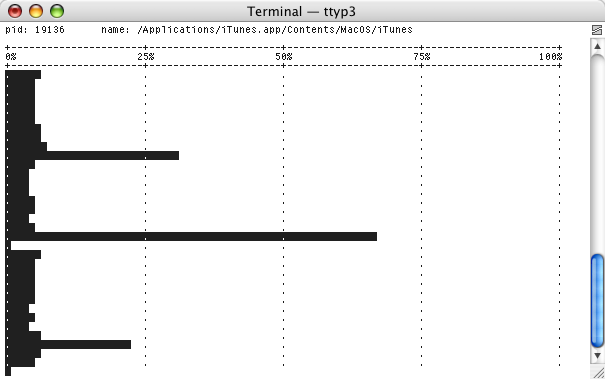
<p>pscpug graphs a given process’s CPU usage over time.</p>

<p>This is more useful than, for example, top, if you are looking to 
only see how one specific process’s usage is changing.</p>

<p><img src="/assets/images/pscpug.png" alt="pscpug example" /></p>

<p>pscpug is currently expected to run on Linux and FreeBSD, given recent tests.</p>

<p>pscpug is also available, at last check, as OpenBSD and NetBSD packages.</p>

<h1 id="what-doesnt-it-do">What doesn’t it do?</h1>
<ul>
  <li>pscpug is not useful on a dumb terminal (currently).</li>
  <li>pscpug will build on Mac OS X 10.5, but will not on later versions.</li>
</ul>]]></content><author><name></name></author><category term="software" /><summary type="html"><![CDATA[0.3.5 is the current version of the software pscpug. The last release I made was in 2009, so it’s due for a refresher. What does pscpug do? pscpug graphs a given process’s CPU usage over time. This is more useful than, for example, top, if you are looking to only see how one specific process’s usage is changing. pscpug is currently expected to run on Linux and FreeBSD, given recent tests. pscpug is also available, at last check, as OpenBSD and NetBSD packages. What doesn’t it do? pscpug is not useful on a dumb terminal (currently). pscpug will build on Mac OS X 10.5, but will not on later versions.]]></summary></entry><entry><title type="html">Using alpine with Office365</title><link href="http://www.charlesmercadal.com/technology/alpine/2019/06/21/alpine-office365.html" rel="alternate" type="text/html" title="Using alpine with Office365" /><published>2019-06-21T12:43:00-04:00</published><updated>2019-06-21T12:43:00-04:00</updated><id>http://www.charlesmercadal.com/technology/alpine/2019/06/21/alpine-office365</id><content type="html" xml:base="http://www.charlesmercadal.com/technology/alpine/2019/06/21/alpine-office365.html"><![CDATA[<p>I get a lot of email, and have a copule email accounts to deal with.</p>

<p>One of the things I’ve done to simplify is to standardize on one 
email client.</p>

<p>I use <a href="http://alpine.x10host.com/alpine/">Alpine</a>.</p>

<h1 id="why-alpine">Why Alpine?</h1>
<p>This is where anyone else would try to sell you on Alpine.</p>

<p>I don’t think Alpine is especially highly regarded.  There are 
more techie-friendly options out there – those folks like
<a href="http://www.mutt.org/">mutt</a>.  There are easier-to-setup solutions 
out there, I’m sure, too.  (Office365 Web access).</p>

<p>I chose Alpine because I was familiar with pine (it’s predecessor) and 
because I can manage my email in it quickly with keystrokes.</p>

<p>I’m not sure I want to sell anyone on this solution, <em>per se</em>.<br />
But I am sure I don’t want to have to google how to set up 
all the variables again, if I blow away my configuration.</p>

<h1 id="setup">Setup</h1>
<p>I’m going to assume you’ve installed alpine.</p>

<p>This also assumes you’ve edited a .pinerc file before, 
or can stumble your way through the menus inside Alpine
– within Setup (S), Config (C).</p>

<p>Here were the important things to edit in my .pinerc:
Remove “user.name@domain.tld” and replace with your account.</p>

<pre>
# You want emails to show your name when sent.
personal-name=Charles Mercadal

# smtp-server is the Office365 SMTP server (it sends your mail).
smtp-server=smtp.office365.com:587/tls/novalidate-cert/user=user.name@domain.tld

# set your inbox path... so going to your inbox in alpine displays the right stuff
inbox-path={outlook.office365.com/tls/novalidate-cert/user=user.name@domain.tld}INBOX

# drafts folder setup
postponed-folder={outlook.office365.com/tls/novalidate-cert/user=user.name@domain.tld}Drafts

# this one is important, if you ever want to read stuff you've deleted
# I always forget what this folder is officially called in Exchange/Office365
trash-folder={outlook.office365.com/tls/novalidate-cert/user=user.name@domain.tld}Deleted Items

# expunge-only-manually works with filters specified below to make sure
# deleted stuff gets moved to the trash folder.
# ignore-size-changes seems to be related to an Office365 bug when saving emails.
# The others are personal preference
feature-list=expunge-only-manually,
		convert-dates-to-localtime,
		combined-folder-display,
		ignore-size-changes,
		no-quell-attachment-extension-warn

# This sets the composer to send from your Office365 account
alt-addresses=user.name@domain.tld

# folder-collections pull in all your Office365 folders for viewing.
folder-collections=mail/[],
	Office365 {outlook.office365.com/tls/novalidate-cert}[]

# set up roles and filters
# the filter is the one noted above, that moves deleted stuff into "Deleted Items"
patterns-roles=LIT:pattern="/NICK=Default/FLDTYPE=EMAIL" action="/ROLE=1/FROM=Charles Mercadal &lt;user.name@domain.tld&gt;/RTYPE=NC/FTYPE=NC/CTYPE=NC"
patterns-filters2=LIT:pattern="/NICK=Move deleted to Deleted Items/FLDTYPE=EMAIL/FOLDER=INBOX/STATD=YES" action="/FILTER=1/FOLDER={outlook.office365.com\/tls\/novalidate-cert\/user=user.name@domain.tld}Deleted Items/NOKILL=1"
</pre>

<p>That’s the important stuff to make sure your emails don’t end up 
where you don’t expect them.</p>

<h1 id="other-friendly-stuff">Other friendly stuff</h1>
<p>You can set up a remote config if you want to be able to 
use the same setup anywhere you go.  I have an alias set up so 
I can run this command wherever I check my email.</p>

<pre>
alpine -p '{outlook.office365.com/tls/novalidate-cert/user=user.name@domain.tld}remote_pinerc'
</pre>

<p>You can also create yourself an address book and then 
add that remotely, to be used from anywhere.  From the main screen,
go to setup (S) and then AddressBook (A).</p>

<h1 id="bonus--do-you-like-typing-less">Bonus:  Do you like typing less?</h1>
<p>I run Alpine within <a href="https://github.com/tmux/tmux/wiki">tmux</a>.</p>

<p>This allows me to define common keystrokes and send them through 
into Alpine.</p>

<p>One of the things I don’t like about Alpine is when a specific item 
is only available through multiple layers of menus and/or questions.
This is how I got around it.</p>

<p>I’ve defined a few F-keys to type repetitive things into Alpine
on my behalf.  Here are a few of the highlights.<br />
Put these in your .tmux.conf</p>
<pre>
# F10:  save selected item to Downloads
# This works in a message, when looking at your attachments.
# Select an attachment and hit F10.
# It will open the file browser, search for a folder named Downloads,
# then hit return the requisite number of times to get the download to happen.
bind-key -n F10 send "S" C-t "WDownload" C-m C-m C-m C-m

# F11:  save to archive
# From the message list, select a message and hit F11.
# This one moves into the message collection, looks for a folder
# named "Archive" and saves your message there.
bind-key -n F11 send "S" C-n "Archive" C-m

# F12:  filter now and return to index
# After deleting/moving a bunch of messages, F12 will clean up your inbox.
# It does so by navigating the menus through:
#  Main (M), Setup (S), Roles (R), FilterNow (N), and then back to Inbox (I)
bind-key -n F12 send "MSRNI"
</pre>]]></content><author><name></name></author><category term="technology" /><category term="alpine" /><summary type="html"><![CDATA[I get a lot of email, and have a copule email accounts to deal with. One of the things I’ve done to simplify is to standardize on one email client. I use Alpine. Why Alpine? This is where anyone else would try to sell you on Alpine. I don’t think Alpine is especially highly regarded. There are more techie-friendly options out there – those folks like mutt. There are easier-to-setup solutions out there, I’m sure, too. (Office365 Web access). I chose Alpine because I was familiar with pine (it’s predecessor) and because I can manage my email in it quickly with keystrokes. I’m not sure I want to sell anyone on this solution, per se. But I am sure I don’t want to have to google how to set up all the variables again, if I blow away my configuration. Setup I’m going to assume you’ve installed alpine. This also assumes you’ve edited a .pinerc file before, or can stumble your way through the menus inside Alpine – within Setup (S), Config (C). Here were the important things to edit in my .pinerc: Remove “user.name@domain.tld” and replace with your account. # You want emails to show your name when sent. personal-name=Charles Mercadal # smtp-server is the Office365 SMTP server (it sends your mail). smtp-server=smtp.office365.com:587/tls/novalidate-cert/user=user.name@domain.tld # set your inbox path... so going to your inbox in alpine displays the right stuff inbox-path={outlook.office365.com/tls/novalidate-cert/user=user.name@domain.tld}INBOX # drafts folder setup postponed-folder={outlook.office365.com/tls/novalidate-cert/user=user.name@domain.tld}Drafts # this one is important, if you ever want to read stuff you've deleted # I always forget what this folder is officially called in Exchange/Office365 trash-folder={outlook.office365.com/tls/novalidate-cert/user=user.name@domain.tld}Deleted Items # expunge-only-manually works with filters specified below to make sure # deleted stuff gets moved to the trash folder. # ignore-size-changes seems to be related to an Office365 bug when saving emails. # The others are personal preference feature-list=expunge-only-manually, convert-dates-to-localtime, combined-folder-display, ignore-size-changes, no-quell-attachment-extension-warn # This sets the composer to send from your Office365 account alt-addresses=user.name@domain.tld # folder-collections pull in all your Office365 folders for viewing. folder-collections=mail/[], Office365 {outlook.office365.com/tls/novalidate-cert}[] # set up roles and filters # the filter is the one noted above, that moves deleted stuff into "Deleted Items" patterns-roles=LIT:pattern="/NICK=Default/FLDTYPE=EMAIL" action="/ROLE=1/FROM=Charles Mercadal &lt;user.name@domain.tld&gt;/RTYPE=NC/FTYPE=NC/CTYPE=NC" patterns-filters2=LIT:pattern="/NICK=Move deleted to Deleted Items/FLDTYPE=EMAIL/FOLDER=INBOX/STATD=YES" action="/FILTER=1/FOLDER={outlook.office365.com\/tls\/novalidate-cert\/user=user.name@domain.tld}Deleted Items/NOKILL=1" That’s the important stuff to make sure your emails don’t end up where you don’t expect them. Other friendly stuff You can set up a remote config if you want to be able to use the same setup anywhere you go. I have an alias set up so I can run this command wherever I check my email. alpine -p '{outlook.office365.com/tls/novalidate-cert/user=user.name@domain.tld}remote_pinerc' You can also create yourself an address book and then add that remotely, to be used from anywhere. From the main screen, go to setup (S) and then AddressBook (A). Bonus: Do you like typing less? I run Alpine within tmux. This allows me to define common keystrokes and send them through into Alpine. One of the things I don’t like about Alpine is when a specific item is only available through multiple layers of menus and/or questions. This is how I got around it. I’ve defined a few F-keys to type repetitive things into Alpine on my behalf. Here are a few of the highlights. Put these in your .tmux.conf # F10: save selected item to Downloads # This works in a message, when looking at your attachments. # Select an attachment and hit F10. # It will open the file browser, search for a folder named Downloads, # then hit return the requisite number of times to get the download to happen. bind-key -n F10 send "S" C-t "WDownload" C-m C-m C-m C-m # F11: save to archive # From the message list, select a message and hit F11. # This one moves into the message collection, looks for a folder # named "Archive" and saves your message there. bind-key -n F11 send "S" C-n "Archive" C-m # F12: filter now and return to index # After deleting/moving a bunch of messages, F12 will clean up your inbox. # It does so by navigating the menus through: # Main (M), Setup (S), Roles (R), FilterNow (N), and then back to Inbox (I) bind-key -n F12 send "MSRNI"]]></summary></entry><entry><title type="html">VoIP Blacklist and ipfw</title><link href="http://www.charlesmercadal.com/technology/freebsd/2019/06/19/voip-blacklist.html" rel="alternate" type="text/html" title="VoIP Blacklist and ipfw" /><published>2019-06-19T18:00:08-04:00</published><updated>2019-12-09T12:30:00-05:00</updated><id>http://www.charlesmercadal.com/technology/freebsd/2019/06/19/voip-blacklist</id><content type="html" xml:base="http://www.charlesmercadal.com/technology/freebsd/2019/06/19/voip-blacklist.html"><![CDATA[<p>I’ve been using <a href="http://voipbl.org/">VoIP Blacklist</a> to block 
unwelcome traffic to my Asterisk server.</p>

<p>The site comes with instructions for using with iptables.</p>

<p>I’m running it on FreeBSD with ipfw.</p>

<p>This assumes some familiarity with cron and ipfw.</p>

<p>Here’s the crontab entry I’m using:</p>

<pre>
# voipbl crontab, Charles Mercadal &lt;mercadal+web@gmail.com&gt;
# revision: 1.2
1 */4 * * *     sleep `jot -r 1 0 3540`; curl -s "http://voipbl.org/update/" | awk  '{if (NR!=1) {print}}' &gt; /tmp/voipblip.txt &amp;&amp; ipfw table 5060 list | awk '{print $1}' &gt; /tmp/table5060-current.txt &amp;&amp; awk '{if (f==1) { r[$0] } else if (! ($0 in r)) { print $0 } } ' f=1 /tmp/table5060-current.txt f=2 /tmp/voipblip.txt &gt; /tmp/records_to_add.txt; xargs -n1 ipfw table 5060 add &lt; /tmp/records_to_add.txt &gt; /dev/null 2&gt;&1; bzip2 -f /tmp/records_to_add.txt; bzip2 -f /tmp/table5060-current.txt; bzip2 -f /tmp/voipblip.txt
</pre>

<h1 id="what-it-does">What it does</h1>
<ol>
  <li>The sleep portion of the statement makes it delay for a while, so the request doesn’t hit at the top of the hour every time it runs.</li>
  <li>curl downloads the blacklist.</li>
  <li>the awk statement it’s piped to strips the first line of the output.</li>
  <li>Then, the current ipfw table list is exported to <code class="language-plaintext highlighter-rouge">/tmp/table5060-current.txt</code>.</li>
  <li>awk strips the first line of that output.</li>
  <li>The next awk statement removes any records already in the table from the most recently downloaded list.</li>
  <li>xargs does the heavy lifting of adding new records that weren’t already in ipfw’s table 5060.</li>
  <li>A few bzip2 statements to keep the data on /tmp, in case it needs later review before the next run.</li>
</ol>

<h1 id="making-it-drop-traffic">Making it drop traffic</h1>
<p>All the stuff above does, in short, is to grab new blacklist entries and put them in an ipfw table.  You still need to tell ipfw to block the items in the table with something like:</p>
<pre>
ipfw add 03050 deny udp from table(5060) to any 5060 in
</pre>
<p>… assuming your Asterisk server is running on port 5060.</p>

<h1 id="a-couple-random-notes">A couple random notes</h1>
<ul>
  <li>If your cron is running with jitter enabled for root’s jobs (Vixie cron 
has this option) then you can remove all the the initial sleep stuff from 
the crontab entry.</li>
  <li>I set up my entry that drops traffic to only drop UDP.  I have yet to 
see a tcp sip bruteforce.  But you could change to deny all ip traffic 
on 5060 if you’re paranoid.</li>
  <li>Using the <code class="language-plaintext highlighter-rouge">jot</code> command assumes you’re running BSD.  Which is
likely, since ipfw seems to be standard only on FreeBSD these days.</li>
</ul>

<h1 id="revisions">Revisions</h1>
<ul>
  <li>1.1:  Added a revision number, in case you want to stop back and 
look for updates in the future.</li>
  <li>1.2:  Fixed a (small) bug where the previous script would always 
try to re-add the first record in the ipfw table back into ipfw. No functional 
issues, but not strictly necessary/confusing to someone
trying to read the code.</li>
</ul>]]></content><author><name></name></author><category term="technology" /><category term="freebsd" /><summary type="html"><![CDATA[I’ve been using VoIP Blacklist to block unwelcome traffic to my Asterisk server. The site comes with instructions for using with iptables. I’m running it on FreeBSD with ipfw. This assumes some familiarity with cron and ipfw. Here’s the crontab entry I’m using: # voipbl crontab, Charles Mercadal &lt;mercadal+web@gmail.com&gt; # revision: 1.2 1 */4 * * * sleep `jot -r 1 0 3540`; curl -s "http://voipbl.org/update/" | awk '{if (NR!=1) {print}}' &gt; /tmp/voipblip.txt &amp;&amp; ipfw table 5060 list | awk '{print $1}' &gt; /tmp/table5060-current.txt &amp;&amp; awk '{if (f==1) { r[$0] } else if (! ($0 in r)) { print $0 } } ' f=1 /tmp/table5060-current.txt f=2 /tmp/voipblip.txt &gt; /tmp/records_to_add.txt; xargs -n1 ipfw table 5060 add &lt; /tmp/records_to_add.txt &gt; /dev/null 2&gt;&1; bzip2 -f /tmp/records_to_add.txt; bzip2 -f /tmp/table5060-current.txt; bzip2 -f /tmp/voipblip.txt What it does The sleep portion of the statement makes it delay for a while, so the request doesn’t hit at the top of the hour every time it runs. curl downloads the blacklist. the awk statement it’s piped to strips the first line of the output. Then, the current ipfw table list is exported to /tmp/table5060-current.txt. awk strips the first line of that output. The next awk statement removes any records already in the table from the most recently downloaded list. xargs does the heavy lifting of adding new records that weren’t already in ipfw’s table 5060. A few bzip2 statements to keep the data on /tmp, in case it needs later review before the next run. Making it drop traffic All the stuff above does, in short, is to grab new blacklist entries and put them in an ipfw table. You still need to tell ipfw to block the items in the table with something like: ipfw add 03050 deny udp from table(5060) to any 5060 in … assuming your Asterisk server is running on port 5060. A couple random notes If your cron is running with jitter enabled for root’s jobs (Vixie cron has this option) then you can remove all the the initial sleep stuff from the crontab entry. I set up my entry that drops traffic to only drop UDP. I have yet to see a tcp sip bruteforce. But you could change to deny all ip traffic on 5060 if you’re paranoid. Using the jot command assumes you’re running BSD. Which is likely, since ipfw seems to be standard only on FreeBSD these days. Revisions 1.1: Added a revision number, in case you want to stop back and look for updates in the future. 1.2: Fixed a (small) bug where the previous script would always try to re-add the first record in the ipfw table back into ipfw. No functional issues, but not strictly necessary/confusing to someone trying to read the code.]]></summary></entry><entry><title type="html">Heritage Honey</title><link href="http://www.charlesmercadal.com/tea/2019/06/19/heritage-honey.html" rel="alternate" type="text/html" title="Heritage Honey" /><published>2019-06-19T18:00:08-04:00</published><updated>2019-06-19T18:00:08-04:00</updated><id>http://www.charlesmercadal.com/tea/2019/06/19/heritage-honey</id><content type="html" xml:base="http://www.charlesmercadal.com/tea/2019/06/19/heritage-honey.html"><![CDATA[<p>A few weeks ago, I went to my friend Ben Vronko’s wedding.</p>

<p>Ben and I worked together for a couple years, and, while we did,
he drank a lot of tea.  We were all in the habit of placing orders
for tea every few weeks, and sharing what we purchased.</p>

<p>We were drinking so much tea around the office for a time, 
that Ben and Brendan and I were recording the sounds of us 
brewing and sipping tea and publishing them as a podcast.</p>

<p>Ever since then, every so often, I’ll make a purchase from
Mountain Tea of one of my favorite teas,
<a href="https://www.mountaintea.com/products/heritage-honey-oolong">Heritage Honey</a>.</p>

<p>At the risk of sounding like a ad for it, it’s a delicious light-colored 
oolong with a sweet, just a little malty, floral flavor, reminiscent
of (guess what?) … honey.</p>]]></content><author><name></name></author><category term="tea" /><summary type="html"><![CDATA[A few weeks ago, I went to my friend Ben Vronko’s wedding. Ben and I worked together for a couple years, and, while we did, he drank a lot of tea. We were all in the habit of placing orders for tea every few weeks, and sharing what we purchased. We were drinking so much tea around the office for a time, that Ben and Brendan and I were recording the sounds of us brewing and sipping tea and publishing them as a podcast. Ever since then, every so often, I’ll make a purchase from Mountain Tea of one of my favorite teas, Heritage Honey. At the risk of sounding like a ad for it, it’s a delicious light-colored oolong with a sweet, just a little malty, floral flavor, reminiscent of (guess what?) … honey.]]></summary></entry><entry><title type="html">What I’m reading</title><link href="http://www.charlesmercadal.com/reading/2019/06/19/what-im-reding.html" rel="alternate" type="text/html" title="What I’m reading" /><published>2019-06-19T18:00:08-04:00</published><updated>2019-06-19T18:00:08-04:00</updated><id>http://www.charlesmercadal.com/reading/2019/06/19/what-im-reding</id><content type="html" xml:base="http://www.charlesmercadal.com/reading/2019/06/19/what-im-reding.html"><![CDATA[<p>I just finished the audiobook of 
<a href="https://www.thegospelcoalition.org/blogs/kevin-deyoung/">Kevin DeYoung’s</a>
<em>Crazy Busy</em>.</p>

<p>One morning, a few days ago, I couldn’t sleep, and about 4 in the morning
I went on a bike ride and started listening on my headphones as I rode along.</p>

<p>It was funny, because I got around to the part of the book where DeYoung 
was talking about that we weren’t designed to do all things all
the time – that we’re built for (at least) eight hours a day to be 
asleep – right as I was clearly avoiding that important part of my day.</p>

<p>It was comforting to remember, at that moment, that my worries 
sometimes are me just taking on too many things; not all things are
meant to be within my sphere of interest.</p>]]></content><author><name></name></author><category term="reading" /><summary type="html"><![CDATA[I just finished the audiobook of Kevin DeYoung’s Crazy Busy. One morning, a few days ago, I couldn’t sleep, and about 4 in the morning I went on a bike ride and started listening on my headphones as I rode along. It was funny, because I got around to the part of the book where DeYoung was talking about that we weren’t designed to do all things all the time – that we’re built for (at least) eight hours a day to be asleep – right as I was clearly avoiding that important part of my day. It was comforting to remember, at that moment, that my worries sometimes are me just taking on too many things; not all things are meant to be within my sphere of interest.]]></summary></entry></feed>